
While Ago
Cameron S Humphries
While Ago is a last-done and activity tracker for Windows by Cameron S Humphries. This time-since tracker shows how long it has been since you logged a habit or routine—watering plants, a chore, exercise, or anything you repeat. Each activity is a card on a visual workspace; the card grows as more time passes. Organise routines in named workspaces, use list and chart views, and keep your data offline on this PC. No account. One-time purchase of AUD $1.50 on the Microsoft Store.
Get While Ago on the Microsoft Store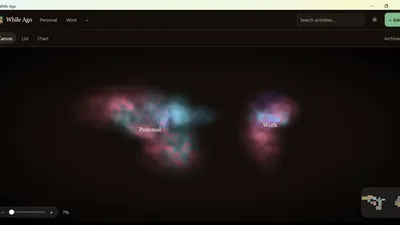
What it can do
While Ago is a Windows activity tracker and routine tracker. You log a habit and the card remembers when. Leave it, and the card grows with the time since you last logged it—a visual last-done tracker—so watering, a chore, or a workout is easier to notice.
- Activities are cards. Marking one done writes the time and the card returns toward its home size.
- The canvas pans and zooms. That view is remembered for each workspace.
- Workspaces keep separate sets of cards. A new workspace starts empty.
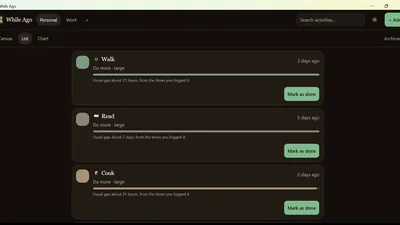
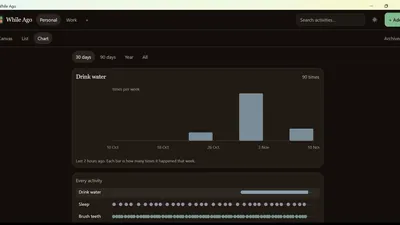
- List and Chart show the same activities another way.
- An expected rhythm can be daily, every few days, weekly, monthly, custom, or learned from the gaps you have already logged.
- A card can be for something you want to do more, something you want to do less, or something you only want to track.
- Search, light and dark, and archive.
A Windows habit tracker with offline storage
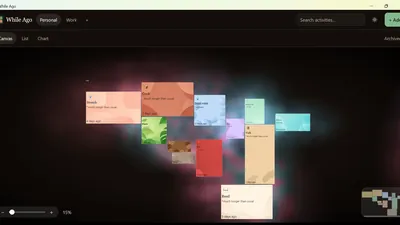
While Ago keeps the times on the computer where you type them. The cards sit in a cluster with a soft cloud behind them. You move around the canvas. Each card shows how long it has been since you logged that activity. A card that has waited longer grows, so it takes more space.
You name the workspaces and the activities. You can switch workspace, change between canvas, list, and chart, and open a card to log an earlier time. The logged times stay on the PC. No account is required.
Canvas
The canvas is the main view. Cards that have waited longer take more space, so the ones that have been quiet are easier to see. Drag a card to move it. The space between cards stays clear. Pan and zoom are kept for that workspace, and the first visit fits every card in view.
Workspaces
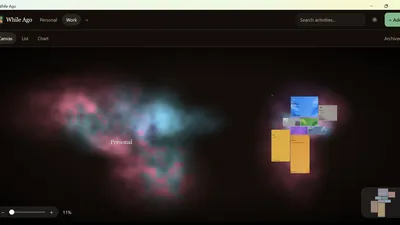
Workspaces are separate canvases, and you choose the names. Personal and work are the two shown in the pictures. The names sit in the header. Adding a workspace starts it with no activities. Switching workspace jumps straight to that canvas, including its cloud, and restores the pan and zoom you left there.
List and chart
List and Chart are other views of the same activities and the times you have logged. They read what is already on this PC. Changing the view does not upload the log.
Search and archive
Search filters the activities by name. Archive sets a card aside and keeps its history, so the canvas can stay on the activities you still want in front of you. Light and dark is saved on this PC and is still selected the next time you open the window.
On your PC
While Ago runs in a Windows desktop window on Windows 10 and Windows 11. The times, workspaces, card positions, pan and zoom, and the light or dark choice are saved on that PC so they are still there the next time you open the app. They stay on that PC, offline.
There is no account and no sign-in. While Ago does not show ads, does not include analytics, and does not send what you log to Cameron S Humphries or to anyone else. It is a Microsoft Store app. Microsoft handles the listing. This website does not take a payment.
FAQ
What is While Ago?
While Ago is a local time tracker for Windows by Cameron S Humphries. It shows how long it has been since you logged an activity, such as watering, a chore, exercise, or another routine. Each activity is a card, and the card grows as more time passes. You can keep custom workspaces. The times stay on the PC. There is no account. It is a Microsoft Store app.
What can While Ago do?
You log an activity and the card shows how long it has been. The card grows as more time passes. Cards sit in a cluster you can pan and zoom. Custom workspaces keep separate sets of cards, and each workspace remembers its own view. There is also a list and a chart of the logged times. You can search, switch light and dark, and archive a card. The log stays on the PC.
Does While Ago need an account?
No. There is no sign-in and no server. While Ago does not show ads and does not include analytics. The times stay on the PC.
Where are the times stored?
On Windows the app stores its data in localStorage inside the WebView that draws the window. That storage lives on the PC, under the local app data folder for com.whileago.app. It is not uploaded.
Which versions of Windows run While Ago?
While Ago is a desktop app for Windows 10 and Windows 11.
Is While Ago on the Microsoft Store?
Yes. While Ago is a Microsoft Store app. Microsoft handles the listing. This website does not take a payment. The product page and the privacy policy are on this site.
How much does While Ago cost?
While Ago is a one-time purchase for AUD $1.50 on the Microsoft Store. There is no subscription and no in-app purchases. Microsoft processes the payment; your local price is shown on the Store listing before you buy.
Support

Ko-fi is optional. The donate page has no checkout, and a gift there does not send the activity log.